
You can use the Manufacturer V2 API to integrate the shopfloor and the enterprise resource planning (ERP) systems with the Serialized Manufacturing application.
The Manufacturer V2 API uses the Representational State Transfer (REST) standard to interact with other systems.
The Manufacturer V2 API is an extension of the Serialized Manufacturing application of Movilitas.Cloud that enables you to send requests from external systems to the application.
The following figure provides an overview of all the requests that you can send by using the Manufacturer V2 API:
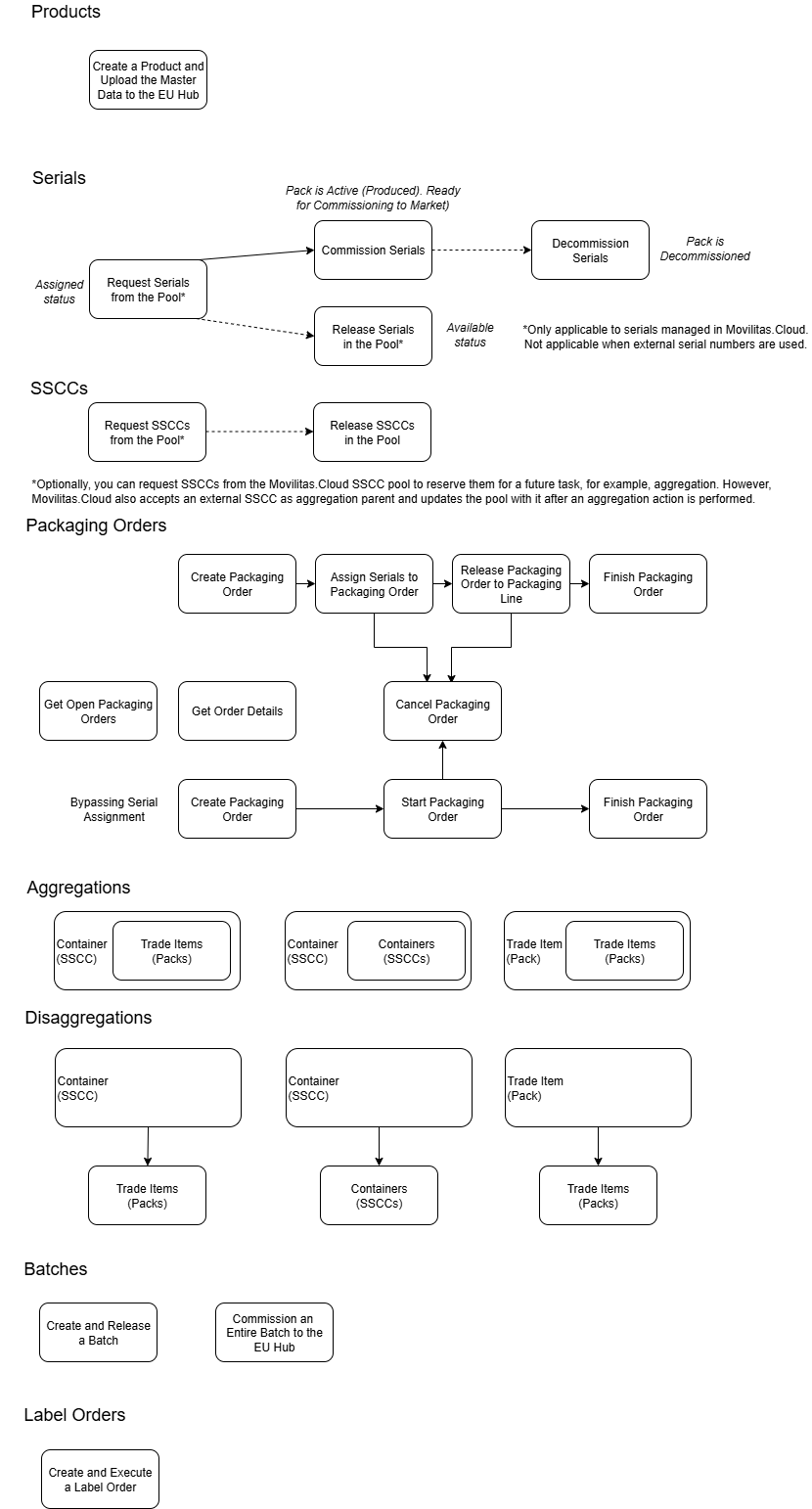
This article describes how to commission an entire batch to the EU Hub in the Serialized Manufacturing application using the Manufacturer V2 API.
API Tool to Use
In this document, we provide examples by using the cURL command-line tool. To send the API request, you can find a lot of user-friendly REST API tools on the Internet, for example, Postman.
Before You Begin
1. You must enable the Serialized Manufacturing application.
2. You must create an API key and secret.
3. You must create a shopfloor channel with the Manufacturer V2 API source. You will need the channel key for your requests.
4. You must configure the Serialized Manufacturing application and the channels required to connect to external systems.
5. You must have the authentication token to send requests over API. Select one of the following ways:
- Apply a dynamic token. Send an authentication request over the Authentication API. For more information about the Authentication API, open the Tenant Dashboard in Movilitas.Cloud, select API keys, and choose Authentication API Documentation. Also, see Authentication Request.
- Apply a static token. Generate a static token for your previously created API key.
For more information, see Configuring the Movilitas.Cloud APIs.
Procedure
1. Use the POST method and the following URL:
https://api-acc.movilitas.cloud/v1/manufacturer/v2/api/batches/commission
2. For the header, define the content type (JSON), the authentication token, and the channel key.
The token can be given in one of the following ways:
- As x-access-token header.
- As Authorization header by using the Bearer schema.
Header Option 1
| Key | Action |
|---|---|
| Content-Type | Apply JSON format for the content. Use the value application/json. |
| x-access-token | Provide the authentication token. |
| x-channel-key | Provide the channel key of your Manufacturer V2 API channel. |
Header Option 2
| Key | Action |
|---|---|
| Content-Type | Apply JSON format for the content. Use the value application/json. |
| Authorization | Provide the authentication token as Bearer <token>. |
| x-channel-key | Provide the channel key of your Manufacturer V2 API channel. |
3. In the body of the request, define the parameters and their values based on the table below.
| Field | Required or Optional? | Type | Description |
|---|---|---|---|
| product_code_schema | Required | String | Product code schema. The application supports one value, "GTIN". |
| product_code | Required | String | Product code. |
| batch | Required | String | Batch ID. |
| market_id | Required | String | The market of the product. The application supports one value, "EU". |
| manufacturer_mah_tag | Required | String | MAH of the product. Use the MAH tag specified for the MAH in the EU Hub channel settings. |
4. Send the request. The entire batch of the product is commissioned to the EU Hub. All items are put into Commissioned status in Movilitas.Cloud.
If the tenant is a repacker, Movilitas.Cloud supports two scenarios:
- Scenario A: The repacker does not perform the repackaging in Movilitas.Cloud, so the repackaging service is not activated in the Serialized Manufacturing application settings. The application includes the original product details in the commissioning request sent to the EU Hub (see the “sourceRepackBuffer” part of the request):
- The original product code scheme is always GTIN.
- The non-serialized origin product code is taken from the product master data settings that must be specified in advance.
- The original batch value is the one given with the packs to be commissioned.
- Scenario B: The repacker performs the repackaging in Movilitas.Cloud, so the repackaging service is activated in the Serialized Manufacturing application settings. The items to be commissioned to the EU Hub come from a label (printing) order with origin fields:
- The logic takes the origin product code and origin batch from the label order and includes the origin values in the commissioning request towards the EU Hub (see the “sourceRepackBuffer” part of the request).
- If the origin product code is a custom code in the label order, the application finds the GTIN linked to the custom code in the system and uses the GTIN as the old (sourced) product in the commissioning request towards the EU Hub.
Sample cURL Request
curl -X POST \
  https://api-acc.movilitas.cloud/v1/manufacturer/v2/api/batches/commission \
  -H 'Content-Type: application/json' \
  -H 'x-access-token: eyJhbGciOiJIUzI1NiIsInR5cCI6IkpXVCJ9.eyJrZXkiOiKzX2FqazQyS3RLQWhHdiE4TUZtY1Q2Uzh' \
  -H 'x-channel-key: Ky1SpfEXmjj05fW3USBFD3pgoEi9AQ29Atsnj4Zy' \
  -d '{
    "product_code_schema": "GTIN",
    "product_code": "02026041310005",
    "batch": "MCS36041",
    "market_id": "EU",
    "manufacturer_mah_tag": "cloud-mah"
}'
Sample Response (Success 200)
{
    "success": true,
    "message": "Batch successfully commissioned"
}
Error Types and Resolution
This section lists some of the most general error types when sending the request.
| Error Message or Error Type | Error Code | Description |
|---|---|---|
| No token provided | ERR0001 | No authentication token is provided. Ensure that you add the authentication token to the header of the request. |
| Failed to authenticate token | ERR0000 | Failed to authenticate the provided token. Double-check if your token has expired or has been revoked. Obtain a valid token by generating a static one or by getting a dynamic one through Authentication API. |
| Channel ID is missing or it needs to be in correct format | - | The channel key of your Manufacturer V2 API channel is not specified in the request. To get the channel key, go to Tenant Dashboard --> Channels in the Admin UI, open your Manufacturer V2 API channel, and find the channel key on the top of the Edit shopfloor channel panel. |
| Request body could not be parsed | - | The syntax of the request body is not correct, for example, a comma is missing at the end of a field. Make sure that the request body is defined in the correct way and that you use JSON format. |
| Product XXX does not exist | - | The given product code is not registered in the Serialized Manufacturing application. Make sure that you give the correct product code in the request, and the product code is registered in the Serialized Manufacturing application under the Products --> Products tab. |
| Batch XXX does not exist | - | The given batch is not registered in the Serialized Manufacturing application. Make sure that you give the correct batch in the request, and the batch is registered in the Serialized Manufacturing application under the Products --> Batches tab. |
| MAH not found | - | A MAH with the given tag does not exist in the EU Hub channel settings. Make sure that the correct MAH tag is given in the request. |
| Commissioning failed because origin product code and origin batch cannot be determined from the label order | - | Items of the batch come from an executed label order. Since "Repackaging" is activated in the Serialized Manufacturing application settings, the logic takes the origin product code and origin batch from the label order and includes the origin values in the EU Hub commissioning request. If the origin product code and origin batch fields are missing in the label order, it is not possible to commission the entire batch. Because the label order is already executed, contact Movilitas.Cloud Support to resolve the issue by adding the origin values to the label order. Then, send the request again. |
