View the history of a specific pack (trade item) in the Serialized Logistics application.
Before You Begin
Make sure that the product code and the serial number are registered in Movilitas.Cloud.
Procedure
1. In the Serialized Logistics application, select the SSCCs and Packs --> Pack history tab.
2. Enter the product code and serial number in the applicable fields.
3. Click Get Pack History.
The application displays:
| Section | Description |
|---|---|
| Summary | Pool status, pack status, and parent. For an item in the USA market, the user can set the authenticity. |
| Pool History | The actions performed on the serial and the status for each action. |
| Pack History | The actions performed on the pack (trade item) and the result per action. |
| Pack Hierarchy | The underlying hierarchy of the pack (trade item) up to the lowest child, with details for each level. By default, the application displays only the pack under investigation and the number of child trade items (if any). The user can expand each level for further details and the application displays data for the next level as described above. The application shows the child trade item first, and then it shows the content of the child trade item after expanding the child trade item. |
The serial number can take one of the following statuses in the pool:
| Status | Description |
|---|---|
| Available | The serial number is free to use. |
| Assigned | The serial number is reserved for an activity. |
The pack having the serial number can take one of the following statuses:
| Status | Description |
|---|---|
| Active | The pack is produced but not yet commissioned to the market. |
| Commissioned | The pack is commissioned to the market. |
| Decommissioned | The pack is decommissioned due to one of the following reasons:
|
| Unknown | A status meaning that the pack was not known by Movilitas.Cloud. |
In the following cases, the application displays a pop-up:
- The pack is not in possession (shipped), so the provided data may not match the current reality.
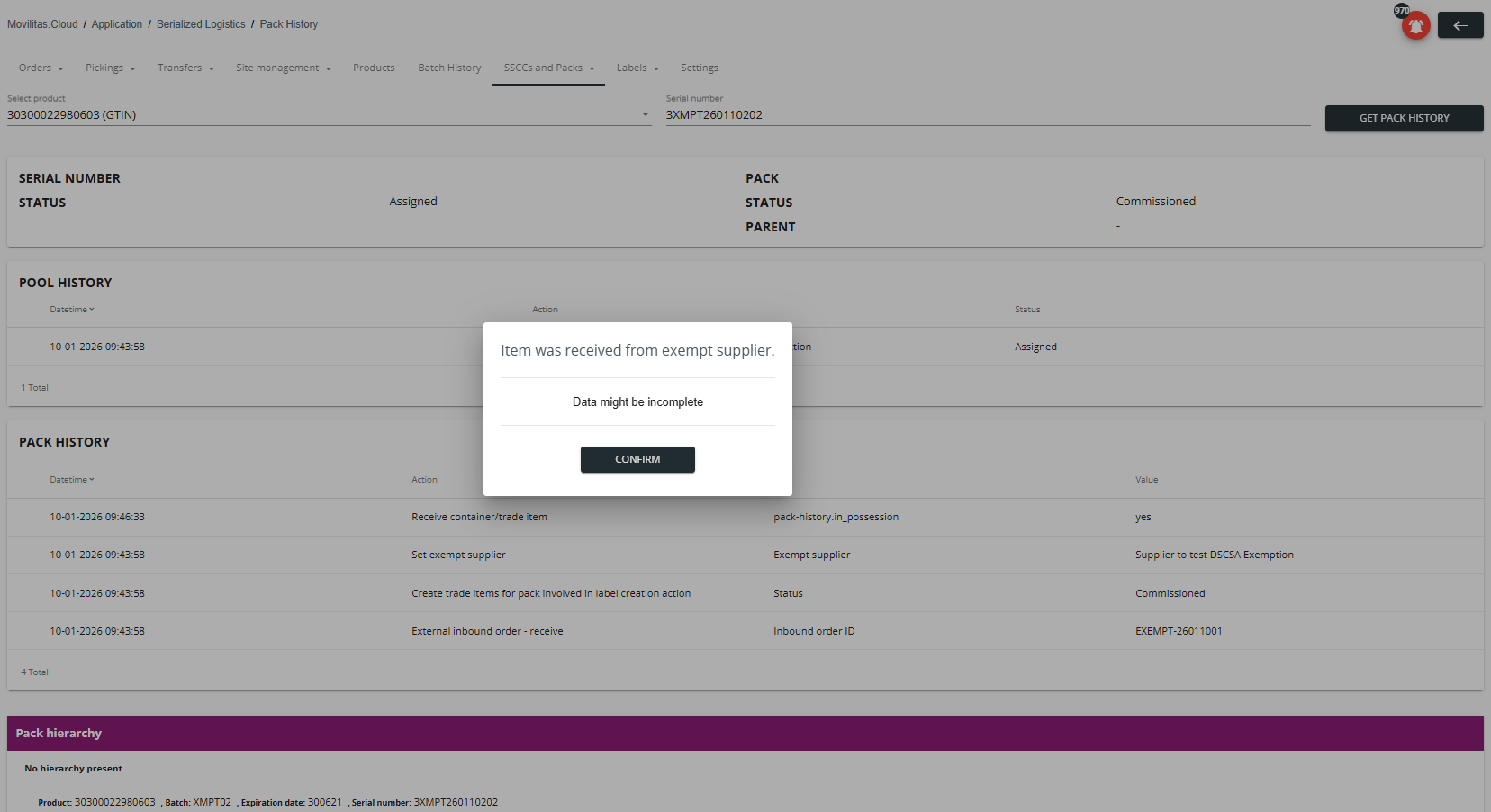
- (USA market only) The pack was received from an exempt supplier, so the item is exempt from DSCSA and the stored data might be incomplete.
The following example illustrates a trade item. The item is aggregated into a container and is a top-level trade item that contains children on multiple levels.
Note: The setup that a trade item contains other trade items is market-dependent.

The following example illustrates a trade item not in possession (shipped). The application displays a pop-up informing the user that the data may not match the current reality (only the last known status can be displayed).

The following example illustrates a trade item that was received from an exempt supplier, so the item is marked as exempt from DSCSA.
- The application displays a pop-up informing the user that the data about the item might be incomplete.
- In this example, the GTIN starts with a non-zero digit, implying it is a parent trade item. The underlying hierarchy is unknown due to the exempt status (EPCIS file was not received from the supplier).